
Seasonal & storage
How to Monitor Your RV in Storage: The Complete Guide (Theft, Batteries, Freeze, Mold)
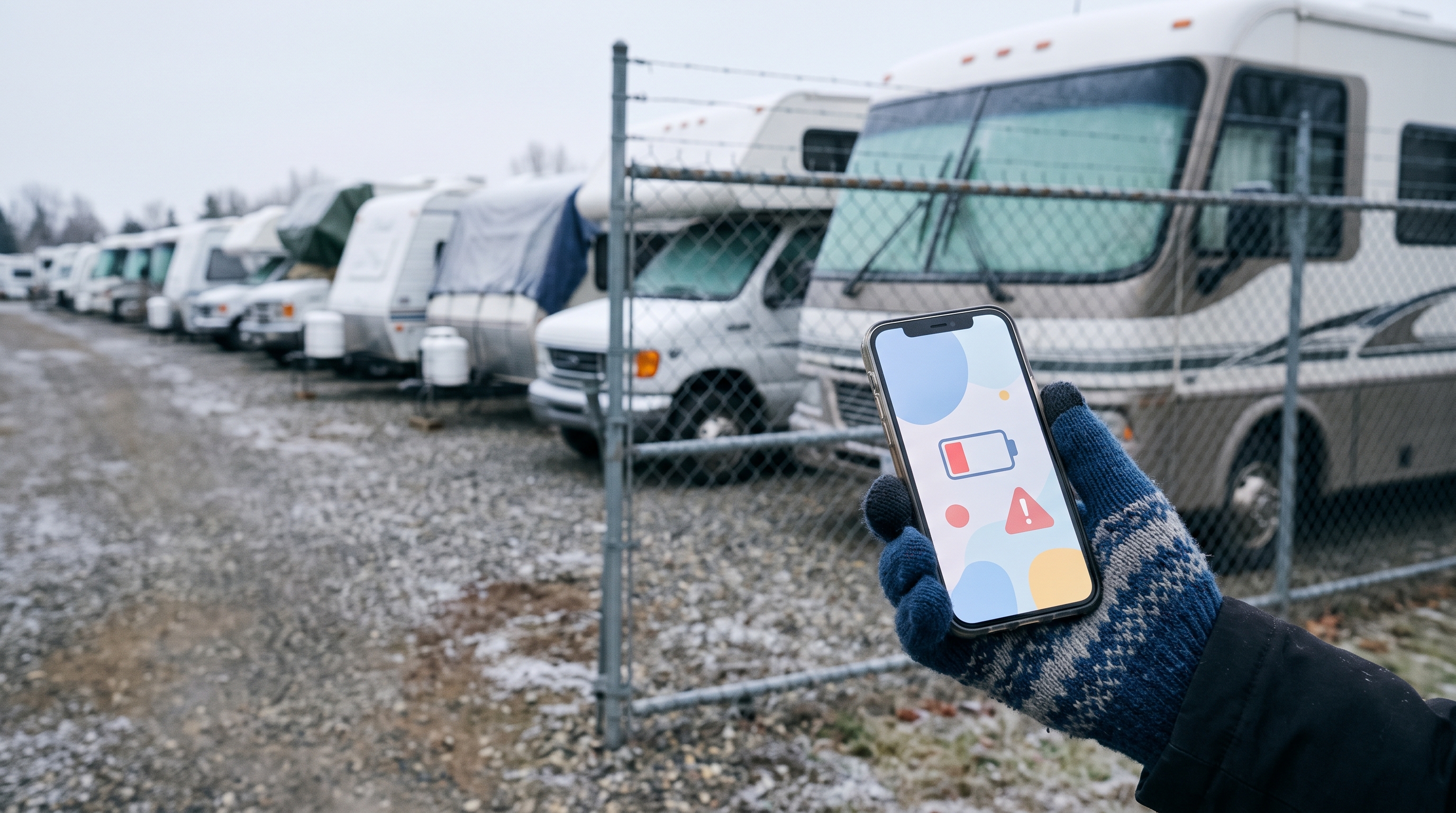
Most RVs get used a few weeks a year. The other 45+ they sit unplugged, unheated, and unwatched — and that's when most of the expensive damage happens, usually discovered weeks late.
Monitoring a stored RV means covering four risks — theft, battery drain, freeze, and moisture — and beating the problem that kills most monitoring gear: no power, no WiFi, sometimes no cell signal.
Risk 1: Theft — the storage lot is the crime scene
A fenced, gated lot feels safe, but most RV storage security is perimeter theater. Per RV Travel's reader-reported theft database (cited by Progressive), roughly 41% of RV thefts happen at storage facilities — the most common location — and about 82% of stolen RVs are travel trailers: no ignition to defeat, just a coupler that wants to be hitched. (Self-reported data — hold the precision loosely.)
Time kills recovery odds — per NICB, about a third of recovered vehicles turn up the same day, nearly half within two days — and a storage-lot theft can go unnoticed for weeks.
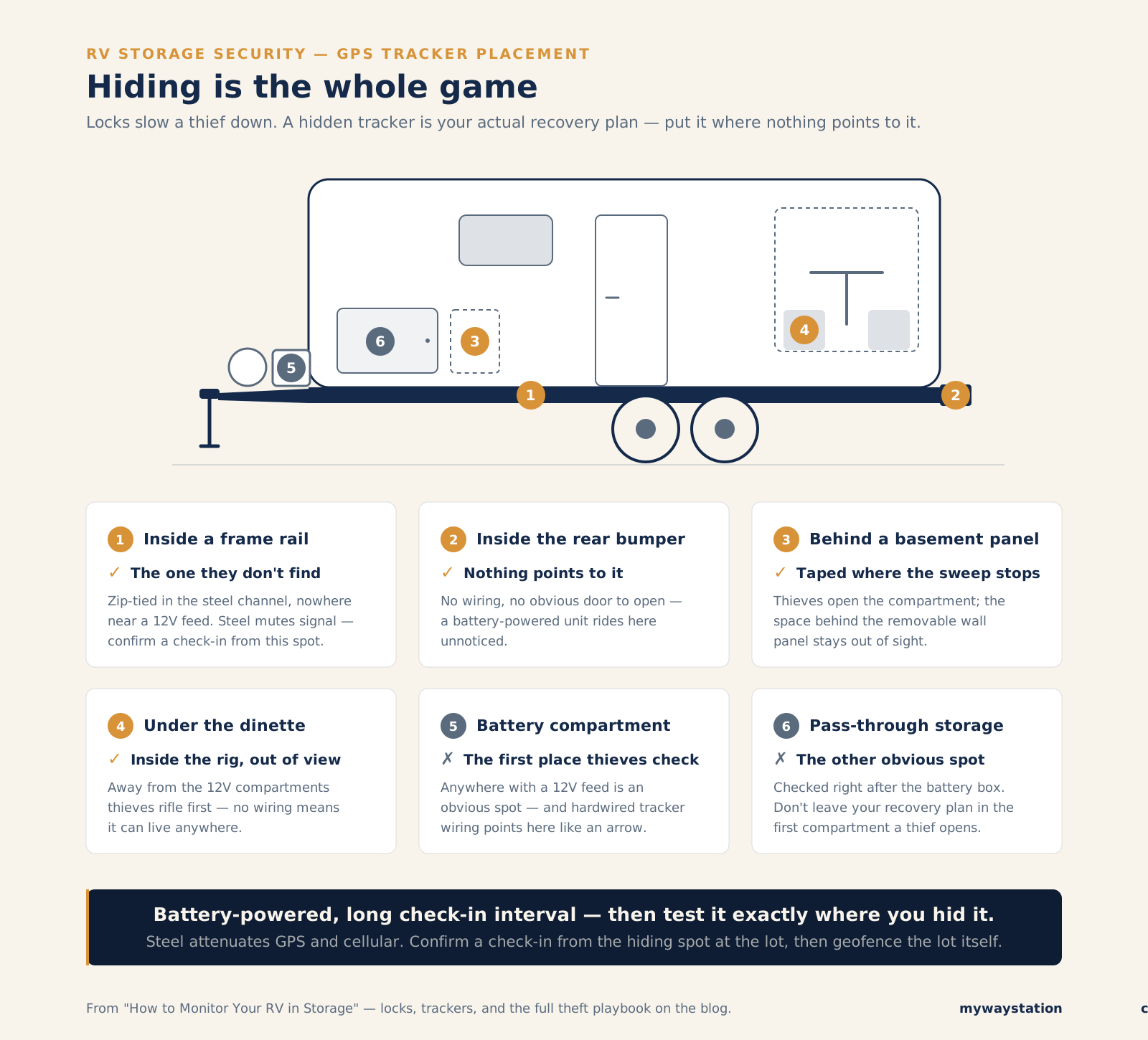
Where to hide a GPS tracker — and the two spots thieves check first.
GPS trackers: your actual recovery plan
Locks deter; they don't prevent — a battery grinder beats hitch, wheel, and kingpin locks in minutes. A GPS tracker for your RV is the real recovery plan: a live alert with coordinates, not a weeks-late discovery.
- Battery-powered — months to a year-plus per charge on daily check-ins plus motion wake-ups. No wiring, so it hides where thieves don't look (see the diagram above).
- Hardwired — continuous reporting, but tied to the house battery (see Risk 2), and the wiring points to the hiding spot.
Battery-powered wins in storage. Plans run about $4/month for long-check-in units (Monimoto is $49/year) to $10–20/month for real-time trackers like Tracki and LandAirSea. Turn on geofencing: an alert the moment the rig leaves the lot. For picks, see our ranked comparison of RV monitoring systems.
Cameras: mostly a fantasy at a storage lot
Cameras assume wall power and WiFi; a storage lot has neither. Solar-battery cameras last weeks in the cold per owner reports, and a theft recorded to microSD leaves with the trailer. A cellular trail camera works if the lot has signal; most should spend the money on a tracker and locks.
The facility-security reality check
Ask: are the cameras monitored or just recording? Does anyone pull gate logs? Anyone there overnight? Usually no, no, and no — you're buying fenced parking. How to secure an RV in storage comes down to layers you bring: real locks, a hidden tracker, your own monitoring.
Risk 2: RV battery drain in storage
The most common storage casualty: the house battery, drained by loads you didn't know were running, then left flat for months — a lead-acid death sentence via sulfation.
The disconnect-switch gotcha
Every owner forum documents it — see iRV2's "Battery Draining in storage" and "Parasitic Battery Drain": the factory "battery disconnect" switch does not disconnect everything. By RVIA spec, safety devices — the propane detector, often the CO detector — are wired around it, and stereo memory and other always-on modules often stay live too. Tiny draws times 2,900 hours (four months) is a dead battery — with the switch "off" the whole time.
The fixes:
- A true hard disconnect — pull the negative cable or put a knife/marine switch at the post. (Detectors go dark too; reconnect before anyone sleeps aboard.)
- A solar maintainer — offsets the draw, but needs real sun (not indoor storage); an undersized panel "floats" a battery while a parasitic load kills it.
- Remote voltage monitoring — the option almost nobody uses. A battery caught at 12.2V is a Saturday errand; 10.9V in April is a receipt.
Risk 3: Freeze — winterizing is a bet, monitoring is the hedge
RV winter storage rests on a bet: that a human winterized perfectly. Humans miss things — a low spot the pump didn't purge, an ice maker line. Shops profit every spring on "definitely winterized" rigs, split fittings running into the hundreds or thousands.
A temperature sensor near the plumbing bay tells you when the bet is being tested: 31°F for two hours means relax; a week at 12°F means drive over with a heater.
The bare minimum is a freeze/water-leak alarm like Kidde's Water Leak + Freeze Detector — about $45, battery-powered, 85dB. The honest catch: its app alerts need WiFi, so in a no-WiFi lot it only helps if someone's within earshot — fine in a side yard, useless in the back row. That tradeoff, and five sensors worth a look, are in our RV water leak detector roundup.
Got shore power? Add a thermostatic outlet plug (on at ~35°F, off at ~45°F) with a small ceramic heater — pair it with the temperature sensor so a tripped breaker doesn't become a spring cracked fitting — and proper surge/EMS protection on the pedestal.
Risk 4: Moisture and mold — the quiet one
A closed RV is a terrarium: trapped moisture, temperature swings, no air exchange — and by spring, that smell. Remediation often costs more than the rig is worth. Humidity is the cheapest risk to monitor (most remote temperature sensors report it free); desiccants, a small dehumidifier, or ventilation are cheap fixes if you know you need them. Details in our RV humidity and mold guide.
The real boss fight: connectivity in a storage lot
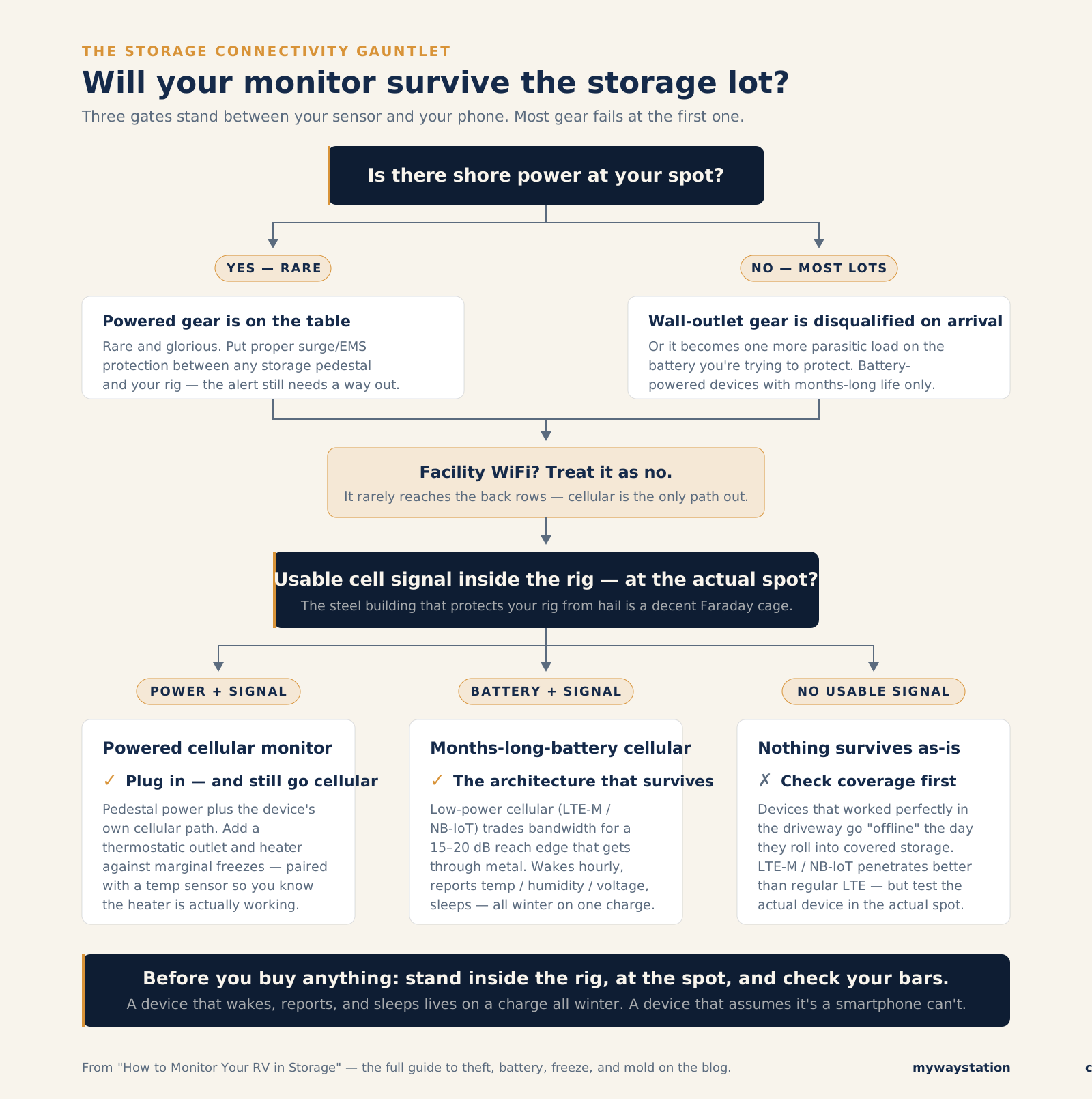
Three gates between your sensor and your phone; most gear fails at the first.
Everything above assumes an alert can escape the RV. Three things break that:
- No shore power. Anything needing a wall outlet is out — or drains the battery you're protecting.
- No WiFi. Facility WiFi rarely reaches the back rows; don't trust it.
- Sometimes no cell signal. A steel building is a decent Faraday cage; owners report gear going "offline" the day it rolls into covered storage.
What survives: battery-powered devices with months-long life, reporting over cellular — ideally LTE-M or NB-IoT, low-power cellular with a 15–20 dB link-budget edge over regular LTE, enough to get through a metal building. A device that wakes hourly, reports, and sleeps can last all winter. Before buying, check your bars inside the rig at the storage spot — see our guide to internet and connectivity for RV monitoring.
The candid state of the market: you can assemble all this today from separate parts, but you can't buy it as one product covering all four risks. Everyone in our monitoring comparison solves a slice; nobody has shipped the whole thing. Storage — where your RV spends most of its life — is the scenario the industry designs around last.
The monthly storage check
Sensors don't smell propane or notice a slashed tire — visit monthly too:
- Walk the perimeter first — hitch-lock scratches, pried doors, footprints.
- Check tires — pressure, sidewalls, covers, blocking.
- Verify the battery — real voltage, not "the panel lights up"; below ~12.4V resting (lead-acid), intervene.
- Confirm the tracker and monitor check in — from the rig, testing signal there.
- Open up and smell — must announces mold early; check ceiling corners and window frames.
- Scan for water — stains, soft floors, drips under the plumbing bay, roof penetrations.
- Look for rodents — droppings, nests, chewed insulation; check the furnace compartment.
- Rotate consumables — desiccants, propane, vent settings.
- Log it — "battery 12.5V, RH 51%, no leaks" turns next month into trend data.
This whole routine, on one printable page.
The before-you-leave-it steps and the monthly check, organized by the four risks — checkbox by checkbox. Clip it to the visor or tape it inside a basement door.
FAQ
Should I disconnect my RV battery for storage? Yes — but the factory switch isn't a full disconnect: safety detectors and memory circuits stay live by design. Pull the negative cable, add a switch at the post, or keep it maintained and monitored.
How do I keep my RV battery charged in storage? A hard disconnect, a solar maintainer sized to beat the parasitic draw (outdoor only), or shore power with a multi-stage charger — plus voltage monitoring so you know it's working.
Do GPS trackers work inside metal storage buildings? Often poorly — steel weakens GPS and cellular signals, though some trackers buffer their position and report once the thief drives out. LTE-M/NB-IoT penetrates best; test your device in the actual spot.
Is indoor RV storage safer than outdoor? For weather and UV, yes. For theft it helps but doesn't immunize — and metal buildings block the signal your monitors need. Verify connectivity from inside before you sign.
Bottom line
Storage is where RVs spend most of their lives and take most of their damage. The fix is a small system: locks plus a hidden GPS tracker, a hard disconnect or maintainer plus voltage monitoring, temperature alerts as the winterization backstop, a humidity sensor, and a monthly walk-through — built on battery-powered cellular devices tested at the actual spot.
Today that means assembling parts that don't talk to each other; our monitoring system comparison will help you pick them. The integrated version — one purchase, one set of alerts for the 45 weeks nobody's watching — doesn't exist yet.